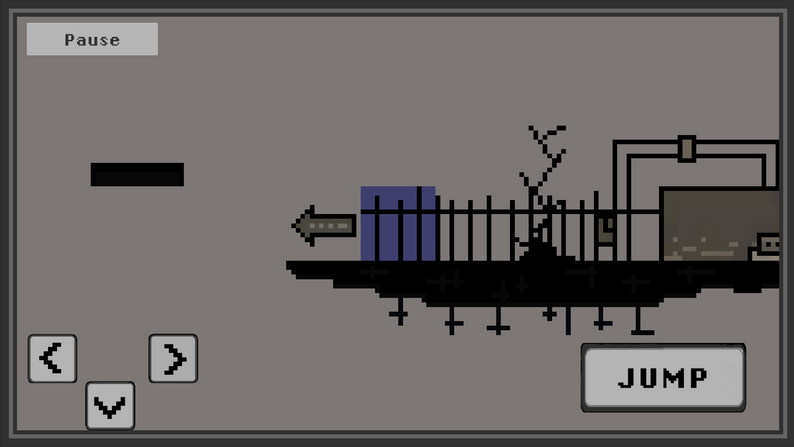
Block Blocker
Unity / C# • Glitched '25 Champion • Stage 2 Finalist at Genesis 4.0 (AIT Pune)
> System_Overview
Block Blocker is an award-winning tactical blocker game built from concept to deployment in Unity. Its custom Negative-Edge input handling, modular state machines, visual deception, and razor-sharp timing turn a simple 2D platformer into a high-stakes systems challenge.
Originally developed during the Glitched 2025 GameJam where it captured 1st Place, the project was subsequently scaled with expanded course trials, qualifying into Stage 2 of Genesis 4.0 at Army Institute of Technology (AIT) Pune.
Built for Android and WebGL (Browser), Block Blocker features 3 distinct map courses across 3 unique tilemap environments, ergonomic customizable on-screen touch controls, and locked 60 FPS performance in its brain-bending Negative Edge (Release-to-Jump) Time-Trial mode.
> Trials & Game Modes
Traditional intuitive input: jump executes instantly upon initial touch contact (PointerDown). Designed for navigating complex hazards and learning course geometry.
The signature brain-bending trial: jump triggers ONLY upon lifting your finger (PointerUp). Inverting muscle memory creates an intensely addictive speedrun challenge where fumbling is heavily punished.
> Core_Mechanics & Mobile Architecture
-
"Negative Edge" (Release-to-Action) Input Engine
Implemented a custom input dispatcher supporting both standard contact triggers and release-on-up ("Negative Edge") execution. This psychological twist disrupts traditional reflex timing, demanding calculated release pauses to clear gaps.
-
Visual Deception & Severe Fumble Punishment
Designed courses packed with deceptive visual cues—platforms that appear solid but are hazardous, or safe zones that collapse. In Time-Trial mode, falling for these tricks results in a massive fumble, forcing the player to master pure memory over sight.
-
Ergonomic Customizable Touch Layout
Recognizing the precision required on mobile, engineered fully rebindable, customizable touch button anchors allowing players to adjust button positions, spacing, and scale for maximum ergonomic comfort across all Android aspect ratios.
-
Cross-Platform Deployment (Android & WebGL)
Structured the project architecture to deploy seamlessly across both native Android devices and WebGL for frictionless browser-based playability, ensuring locked 60 FPS performance during high-speed platforming.
> Code_Snippet: Negative Edge Input Dispatcher
// Negative Edge (Release-on-Up) vs Standard Input Controller (Unity C#)
public class JumpController : MonoBehaviour, IPointerDownHandler, IPointerUpHandler {
    [SerializeField] private bool isTimeTrialRageMode = false;
    [SerializeField] private PlayerMotor playerMotor;

    public void OnPointerDown(PointerEventData eventData) {
        // In Normal Mode: Jump instantly on touch down
        if (!isTimeTrialRageMode) {
            playerMotor.ExecuteJump();
        }
    }

    public void OnPointerUp(PointerEventData eventData) {
        // In Time-Trial Mode: Negative Edge trigger on finger release
        if (isTimeTrialRageMode) {
            playerMotor.ExecuteJump();
        }
    }
}
> Learnings_&_Impact
Proved how subtle subversions of standard input triggers ("Negative Edge") combined with visual deception can reinvent platforming difficulty and create viral, rage-inducing gameplay loops.
Delivered ultra-smooth performance across Android and Web browser environments, alongside fully customizable UI touch layouts tailored for competitive speedrunning.